CodeBot: Context Engineering for Coding Agents
In this article I’ll walk you through my experience building CodeBot: a context engine for coding assistants.. The goal is simple: given a natural language query about a codebase, find the exact set of functions the user needs.
This is a RAG problem, but as we will see, classical RAG fails on code. We will see why, and how representing code as a graph changes the game.
Motivation
Coding assistants are everywhere now: Copilot, Cursor, Claude Code. They all need one thing to work well: the right context.
When you ask a coding assistant “how does YOLO preprocess images during training?”, it needs to find the relevant source code, read it, and reason about it. The quality of the answer depends on what code gets retrieved. The problem is simple to state: given a user query, find the exact parts of the codebase related to it.
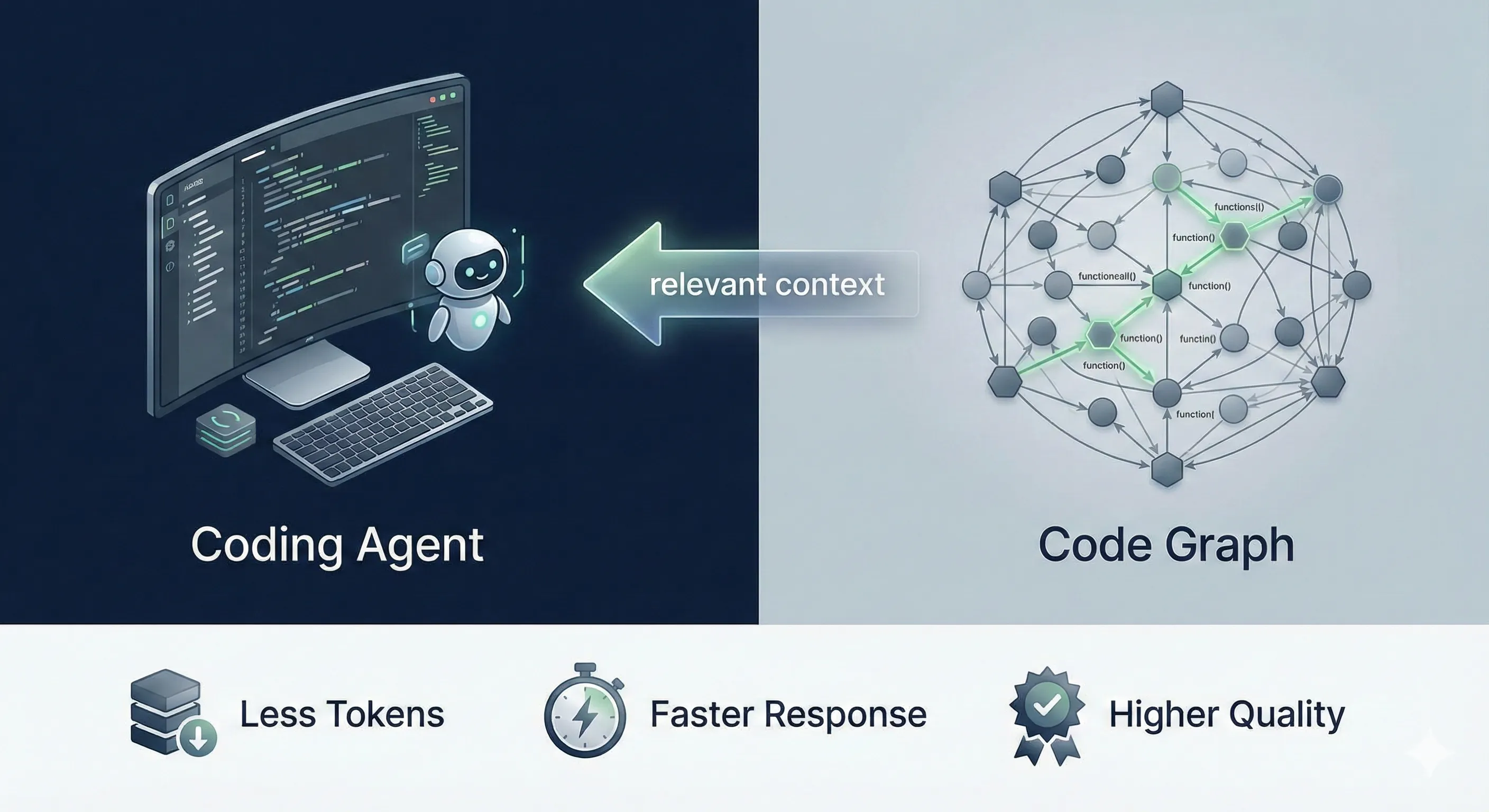
This is a retrieval problem, so naturally, you’d think of RAG. Embed the code, embed the query, do a similarity search. But classical RAG fails on code for several reasons:
- Code is interconnected: a function rarely lives alone, it calls other functions, which call others. To understand preprocessing, you might need to follow 5 levels of function calls.
- Semantic similarity is misleading: functions for training and inference preprocessing often look almost identical. A vector search can’t tell them apart.
- Top-k results don’t capture workflows: a workflow is a chain of function calls, not a bag of unrelated functions.
Getting this right matters a lot for coding assistants:
- Bad context means more tokens consumed (irrelevant code stuffed in the prompt).
- The model needs more reasoning effort to figure out what’s noise.
- Missing a key function in the chain means the model can’t see the full picture.
Better context means less tokens, faster responses, lower cost, and higher answer quality.
Coding assistants use bash tools to find patterns and read entire files. This works well for small and medium sized code bases but may become challenging for large code bases.
Code Parsing
Before we can search code, we need to break it down into searchable units. The natural unit is a function: it has a name, parameters, a docstring, a body, and it lives in a specific file and class.
Extracting functions from source code is a well-solved problem, thanks to Abstract Syntax Trees (AST). It is a tree representation of source code. Instead of seeing code as raw text, the parser sees it as a structured tree:
function_definition
├── name: "train"
├── parameters: ["self", "model", "data"]
├── return_type: "dict"
├── body:
   ├── assignment: ...
   ├── call: self.preprocess(data)
   └── return: results
Every programming language has a well-defined grammar, so parsing code into an AST is straightforward for all languages. The tool I use for this is Tree-sitter, a parser generator that supports 100+ languages and runs in milliseconds.

Here is how we extract all functions from a Python file using Tree-sitter:
import tree_sitter_python as tspython
from tree_sitter import Language, Parser, Query, QueryCursor

language = Language(tspython.language())
parser = Parser(language)

# Define a query to match all function definitions
function_query = Query(language, """
    (function_definition
        name: (identifier) @func_name
        parameters: (parameters) @params
        return_type: (_)? @return_type
        body: (block
            (expression_statement
                (string) @docstring)?
        ) @body
    ) @function
""")

# Parse the source code
source_code = open("ultralytics/models/yolo/detect/train.py").read()
tree = parser.parse(bytes(source_code, "utf8"))

# Run the query
cursor = QueryCursor(function_query)
matches = cursor.matches(tree.root_node)

for _, captures in matches:
    func_node = captures['function'][0]
    name = captures['func_name'][0].text.decode('utf-8')
    print(f"Found function: {name}")
The query language is declarative: you describe the tree pattern you’re looking for, and Tree-sitter finds all matches. This works the same way for JavaScript, TypeScript, Rust, Java, Go, or any other supported language.
For each function, we extract and store the following metadata:
{
  "id": "ultralytics.models.yolo.detect.train.DetectionTrainer.get_model",
  "name": "get_model",
  "file_path": "ultralytics/models/yolo/detect/train.py",
  "class_name": "DetectionTrainer",
  "parameters": [
    {"name": "self", "type": null},
    {"name": "cfg", "type": null, "value": "None"},
    {"name": "weights", "type": null, "value": "None"},
    {"name": "verbose", "type": null, "value": "True"}
  ],
  "decorators": [],
  "return_type": null,
  "docstring": "\"\"\"Get detection model.\"\"\"",
  "start_line": 28,
  "end_line": 40,
  "code": "def get_model(self, cfg=None, weights=None, verbose=True): ...",
  "calls": ["DetectionModel", "self.model.load"]
}
The id field is a unique identifier using the full module path: module.path.ClassName.function_name. This becomes critical later when we build the call graph. Notice the calls field, it lists what this function calls. We'll come back to this.
With all functions parsed and stored, we can start building a search system on top of them.
Classical RAG
The first approach I tried is what everyone tries: embed the functions and search by similarity. We embed both the code and the user query into the same vector space, then find the closest matches.
NL/PL (Natural Language / Programming Language) embedding models have been around for a while. CodeBERT (2020) was one of the first models trained on both code and natural language, and GraphCodeBERT (2021) improved on this by incorporating data flow information.
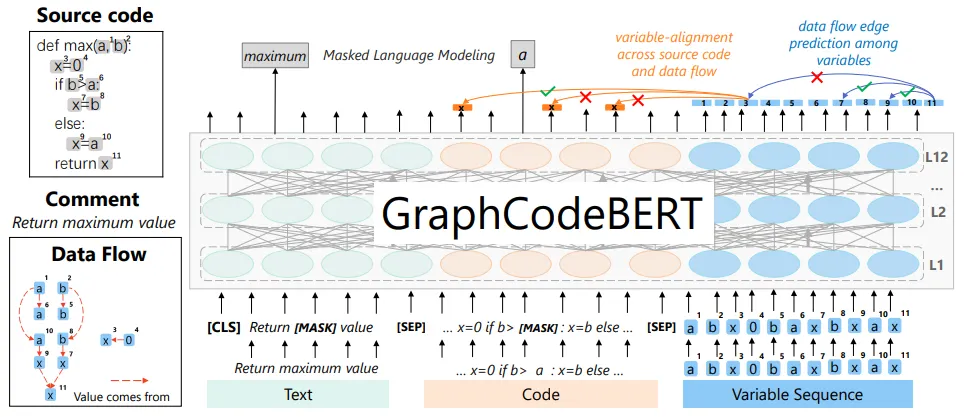
Today, we have models like voyage-code-3 from Voyage AI which is specifically trained for code retrieval with separate document and query embedding modes. For each function, we prepare a text representation that includes the file path, class context, and the full function code:
# File path: ultralytics/models/yolo/detect/train.py

class DetectionTrainer:
    def get_model(self, cfg=None, weights=None, verbose=True):
        """Get detection model."""
        ...
This gets embedded as a document. When a user asks a question, we embed the query and find the closest vectors using cosine similarity.
However, semantic search alone has a blind spot: it doesn’t distinguish between similar workflows. Consider the Ultralytics codebase:
- Training and inference pipelines do very similar things (data loading, preprocessing, model calls).
- Multiple model variants (YOLOv8, YOLOv10, YOLOv11) share most of their code.
- Generic function names like preprocess, postprocess, forward appear everywhere.
This is where keyword matching helps. If the query mentions “training” and “v11”, a keyword search can filter for exactly those terms. We use BM25 ranking on preprocessed text. The preprocessing is important: we split identifiers to make them searchable:
YOLOv11Detector → yolo v 11 detector
train_model     → train model
ResNet50        → Res Net 50
We split on underscores, CamelCase boundaries, and letter-number boundaries. We combine both approaches using Reciprocal Rank Fusion (RRF) and then rerank the results with voyage rerank-2.5 instruction-following reranker.
Let’s test this with a real query on the Ultralytics YOLO repository: “data preprocessing steps in training for YOLO v11 model”. Here is what the top-20 hybrid search returns:
├── DetectionTrainer.preprocess_batch
├── DetectionTrainer.build_dataset
├── DetectionTrainer.get_dataloader
├── DetectionTrainer.auto_batch
├── DetectionTrainer.progress_string
├── DetectionTrainer.label_loss_items
├── DetectionTrainer.set_model_attributes
├── YOLOEPEFreeTrainer.preprocess_batch
├── YOLODataset.build_transforms
├── BaseTrainer.preprocess_batch
├── YOLODataset.collate_fn
├── YOLODataset.close_mosaic
├── BaseDataset.set_rectangle
├── BaseDataset.build_transforms
├── BaseDataset.cache_images
├── BaseDataset.__getitem__
├── BaseDataset.cache_images_to_disk
├── BaseDataset.__init__
├── BaseDataset.update_labels_info
└── on_pretrain_routine_end
As we can see, the search returned functions and methods semantically related to the query, but does not answer the user question. We will show in the coming section how Graph RAG can fix this and return a more relevant answer.
Code Graph
It is natural to represent code as a graph. That’s what a compiler does: it builds call graphs, control flow graphs, and data flow graphs to analyze programs. Researchers have used code graphs for decades to detect vulnerabilities, optimize performance, and understand program behavior.
We can define a code graph where the nodes are functions, classes, and modules, and the edges represent their relationships:
- Calls: function A calls function B
- Contains: class X contains method Y
- Inherits: class X extends class Y
- Data flow: functions A and B process the same variable, even without calling each other directly
- Control flow: function A calls function B only under certain conditions (e.g., inside an
ifblock)
This is the big picture. In practice, I’m currently using only the function calls relationship as graph edges.
After resolving the calls (more on that in the next section), each function knows exactly which other functions it calls:
{
  "id": "ultralytics.models.yolo.detect.train.DetectionTrainer.get_model",
  "calls": [
    "ultralytics.nn.tasks.DetectionModel.__init__",
    "ultralytics.nn.tasks.DetectionModel.load"
  ]
},
{
  "id": "ultralytics.engine.trainer.BaseTrainer.train",
  "calls": [
    "ultralytics.engine.trainer.BaseTrainer._setup_train",
    "ultralytics.engine.trainer.BaseTrainer._do_train",
    "ultralytics.utils.callbacks.base.add_integration_callbacks"
  ]
}
When you connect all these edges, you get a directed graph that represents the entire call structure of the codebase.
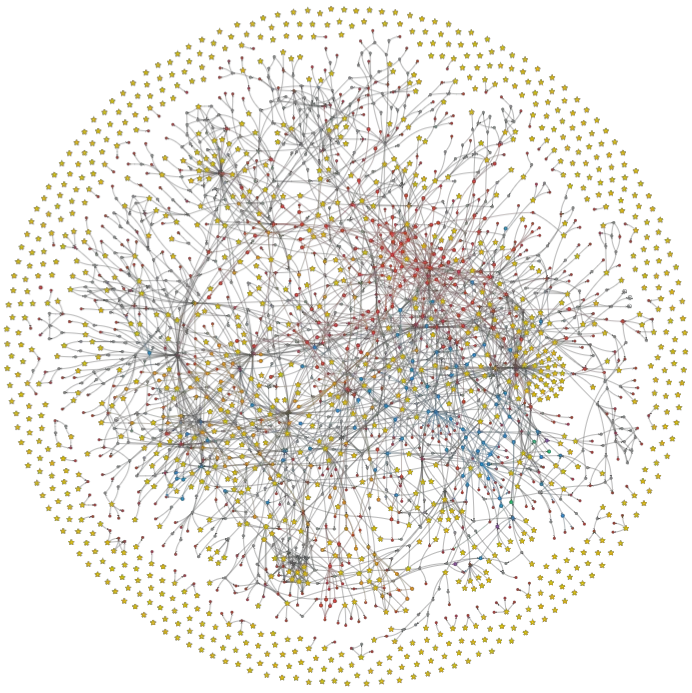
Stars are entry points (functions that call other functions but never get called), and red dots are leaf nodes (functions that are called by others but never call anybody). A workflow starts with an entry point and end with a leaf node.
We only care about internal calls in a code, we remove all calls to external libraries by checking imported modules.
It is not normal to gave hanging stars (functions that don’t call anybody and never get called). It generally means that there are calls that we could not resolve (see next section).
Graph RAG
Building the graph sounds simple, but there’s a nasty prerequisite: we need to resolve function calls to their fully qualified names.
When Tree-sitter parses a function, it gives you the raw call as it appears in the source code:
def train(self, data):
    self.preprocess(data)        # raw call: "self.preprocess"
    augmented = Mosaic(data)     # raw call: "Mosaic"
    callbacks.run("on_train")    # raw call: "callbacks.run"
To build a graph, we need the full qualified name that matches our function IDs:
self.preprocess→ultralytics.engine.trainer.BaseTrainer.preprocessMosaic→ultralytics.data.augment.Mosaic.__init__callbacks.run→ultralytics.utils.callbacks.base.run
This resolution step is where most of the complexity lives. The following table summarizes what we can and cannot resolve statically:
| Status | Pattern | Example | Resolution |
|---|---|---|---|
| Resolved | self.method() |
self.preprocess() |
Follow MRO to find the class method |
| Resolved | super() calls |
super().__init__() |
Resolve to parent class via C3 linearization |
| Resolved | Typed object calls | obj = Cls(); obj.run() |
Resolve to Cls.run if instantiated in scope |
| Resolved | Import calls | callbacks.run() |
Follow import path to full module |
| Resolved | __init__.py re-exports |
callbacks.func |
Resolve from .base import func in __init__.py |
| Resolved | Relative imports | from .utils import helper |
Resolve using file position in directory tree |
| Resolved | Nested functions | inner() inside outer |
Resolve to module.outer.inner |
| Resolved | Decorators | @my_decorator |
Treated as a call from my_decorator |
| Resolved | Builtins to dunder | len(obj) |
Add implicit call to obj.__len__() |
| Resolved | Class instantiation | MyClass() |
Find __init__ following MRO chain |
| Unresolved | Untyped arguments | data.transform() |
Type of data is unknown |
| Unresolved | Polymorphism | model.forward() |
Could be any subclass |
| Unresolved | Dynamic dispatch | getattr(obj, name)() |
Method name computed at runtime |
| Unresolved | Dict/list access | items["k"].process() |
Type of dict value is unknown |
| Unresolved | Factory patterns | create_model("yolo") |
Return type depends on argument |
For the unresolved cases, we use a fallback: if a method name like convert_bbox is unique across the entire codebase (only one function has that name), we resolve it anyway. If there are multiple matches, we skip it to avoid false edges.
Once we have the call graph, we can use graph algorithms to improve our hybrid search results:
- Chain reconstruction: starting from a function, follow all its calls recursively to reconstruct the full execution chain.
- Steiner Tree bridging: given the top-k results from hybrid search, find the shortest weighted paths between them through the full repository graph. Intermediate functions on these paths are added as bridge nodes. They weren’t in the search results, but they are essential to understand the flow.
- Neighbor expansion: Add neighbor nodes to top-k results.
- Entry point detection: functions with 0 in-degree are used to start the chains.
Let’s go back to our original query: “data preprocessing steps in training YOLO v11 model”
With Graph RAG, we first run the hybrid search to get initial results, expand to neighbors, then build the call graph from the full repository, find bridge nodes connecting the terminals via shortest weighted paths, prune nodes, score all call trees and return the best one.
The result is no longer a flat list of loosely related functions. It is a tree of ordered calls showing the actual execution flow:
DetectionTrainer.get_dataloader
├── DetectionTrainer.build_dataset
│   └── build_yolo_dataset
│       └── YOLOMultiModalDataset.__init__
│           ├── YOLODataset.__init__
│           │   ├── BaseDataset.__init__
│           │   ├── BaseDataset.get_img_files
│           │   ├── BaseDataset.set_rectangle
│           │   └── BaseDataset.build_transforms
│           ├─  YOLODataset.get_labels
│           │   ├── img2label_paths
│           │   └── YOLODataset.cache_labels
│           └── YOLODataset.build_transforms
│               ├── v8_transform
│               │   ├── Mosaic.__init__
│               │   ├── LetterBox.__init__
│               │   ├── Compose.__init__
│               │   ├── Compose.insert
│               │   ├── Compose.append
│               │   ├── MixUp.__init__
│               │   ├── CutMix.__init__
│               │   └── Albumentations.__init__
│               └── Format.__init__
└── build_dataloader
Now we can get a better idea of the feature implementation. The results are robust to the number of top-k candidates but depend mainly on the pruning threshold and the chain scoring algorithm.
Note that we apply a community detection algorithm to the graph. We use it to improve reranking scores and to support query rewriting based on the community summary.
MCP Server
So we have a working system. How does it fit into a coding assistant workflow in practice?
The system works in three phases:
- Parse (fast): extract all functions using Tree-sitter, resolve calls, build the graph. This takes seconds to a few minutes depending on the repo size.
- Embed (can be slow): generate vector embeddings for all functions using a code embedding model. For a repo with 5,000 functions, this takes a few minutes with Voyage AI.
- Index the graph store the resolved
callsfield for each function in the database.
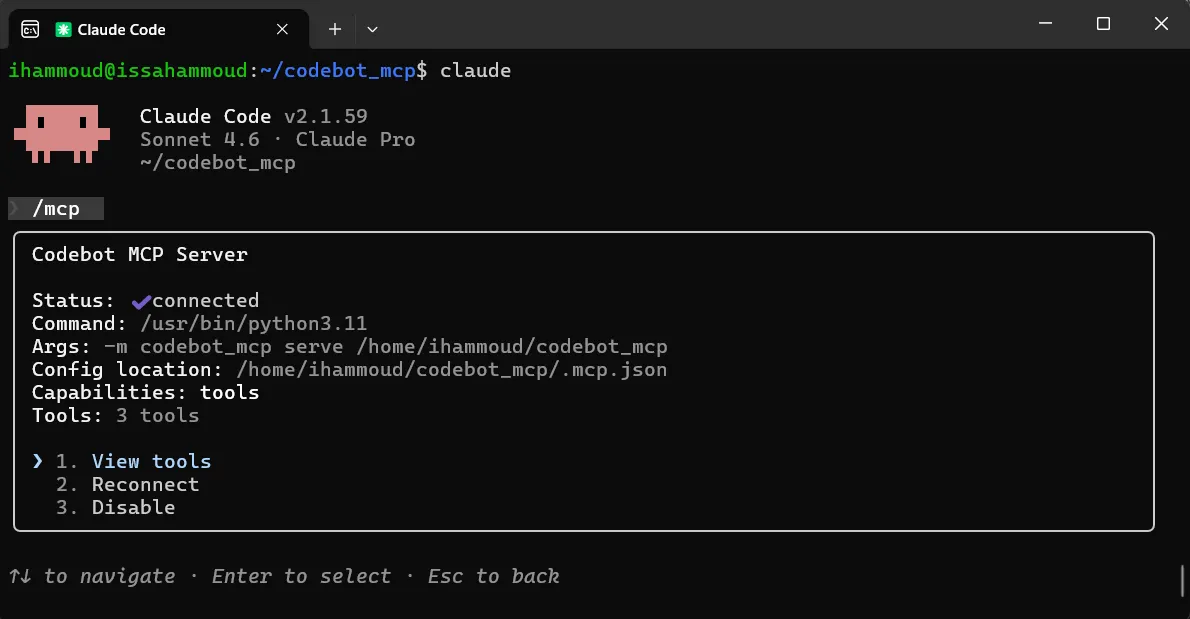
This only needs to happen once per repository. When the coding assistant modifies code, we don’t need to reparse and re-embed everything:
- Detect changed files.
- Reparse only the modified functions.
- Re-embed only those functions.
- Update the graph edges.
The assistant changes a function, the context engine updates its index, and the next search already reflects the changes.
A coding agent can access this system through an MCP (Model Context Protocol) server. The agent sends a natural language query, and the server returns the relevant function chains.
This solution is also interesting for companies with large legacy codebases. When you have millions of lines of code written over decades, with limited documentation and high developer turnover, a context engine that understands the call structure can be very valuable.
Conclusion
Coding assistants need the right code context to be efficient. Classical RAG gives you similar-looking functions. Graph RAG gives you the actual execution flow.
The approach works, but it’s not perfect. Dynamic languages like Python and JavaScript make static call resolution a constant battle. Typed languages like Java, C++, or Rust would make this much easier since type information eliminates most of the ambiguity.
I am planning to open source the code so everyone can try it and improve on it. If you found this useful or interested in the code, don’t hesitate to reach out.